> ## Documentation Index
> Fetch the complete documentation index at: https://docs.plaud.ai/llms.txt
> Use this file to discover all available pages before exploring further.
# Web App to iOS
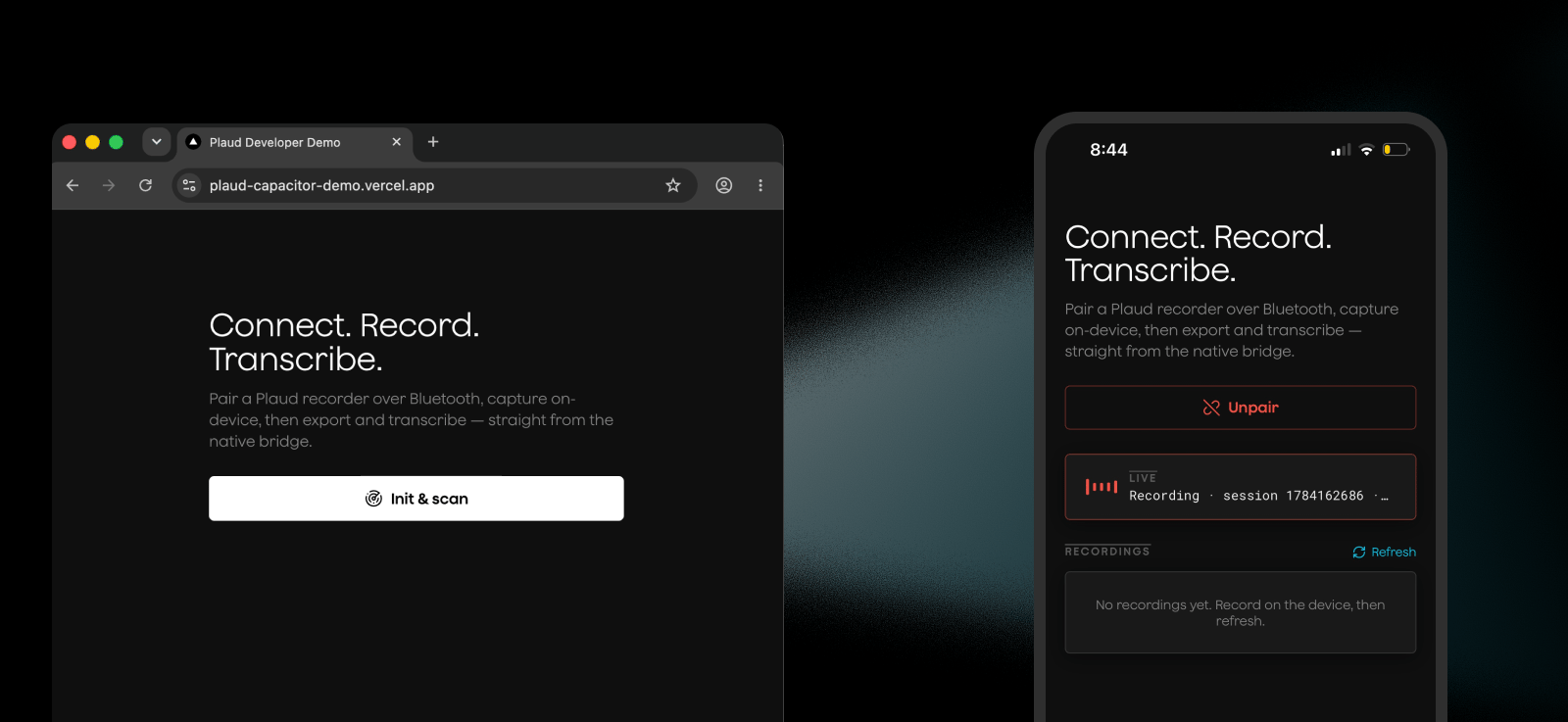
Plaud's iOS SDK can be used through a Capacitor plugin to turn any web app into an iOS native app!
 ## How it works
[Capacitor](https://capacitorjs.com/) is a runtime to run web apps on native platforms. It works by wrapping your web app in a native shell, while Capacitor's bridge sends data from your web app to native features like iOS APIs and BLE.
```
┌──────────────────────────────────────────┐
│ Web App (JavaScript) │
│ PlaudSdk │
└──────────────────▲───────────────────────┘
│
Capacitor Bridge
(JavaScript ↔ IPC)
│
┌──────────────────▼───────────────────────┐
│ PlaudPlugin (Swift/Native) │
│ BLE, Files, iOS APIs, Events │
└──────────────────────────────────────────┘
```
Using the PlaudPlugin for Capacitor is actually using the [iOS SDK](/plaud-embedded/ios-sdk) behind the scenes.
For native iOS apps, use the [iOS SDK](/plaud-embedded/ios-sdk) directly.
## Setting Up Plaud Embedded's Capacitor Plugin
The Plaud Embedded Capacitor Skill has all of the context in these docs so your agent can immediately start wrapping your web app into a native iOS app with Plaud Embedded.
```bash theme={"system"}
npx skills add Plaud-AI/embedded-capacitor
```
### Step 1: Clone our Embedded Capacitor Repo
Clone the Plaud-AI/Embedded-Capacitor repo.
```bash theme={"system"}
git clone https://github.com/Plaud-AI/embedded-capacitor.git
```
This repo includes:
1. PlaudPlugin for Capacitor runtime
2. Typescript interfaces and utility functions for the PlaudPlugin
3. A sample app with a NextJS application using the Capacitor wrapper to work as a native iOS app
4. Plaud Capacitor Wrapper Skill for agents to implement the Plaud Plugin and the Capacitor runtime wrapper
### Step 2: Setup Capacitor
```bash theme={"system"}
npm i @capacitor/core @capacitor/ios @capacitor-community/bluetooth-le
npm i -D @capacitor/cli
```
Then initialize Capacitor to setup your Capacitor configs
```bash theme={"system"}
npx cap init
```
Lastly, add ios to your capacitor project and sync your web app
```bash theme={"system"}
npx cap add ios
npx cap sync ios
```
### Step 3: Setup the PlaudPlugin
Copy the `ios/PlaudPlugin/` framework and paste into the `ios/` directory.
Copy the `ios/App/App/MainViewController.swift` into your `ios/App/App` directory to register the PlaudPlugin.
Your `ios/` directory should look like this:
```
ios/
├── App/
│ ├── App/
│ │ └── MainViewController.swift
└── PlaudPlugin/
├── Package.swift
├── Frameworks/
│ ├── PlaudBleSDK.xcframework
│ ├── PlaudDeviceBasicSDK.xcframework
│ └── PlaudWiFiSDK.xcframework
└── Sources/
└── PlaudPlugin/
└── PlaudSdkPlugin.swift
```
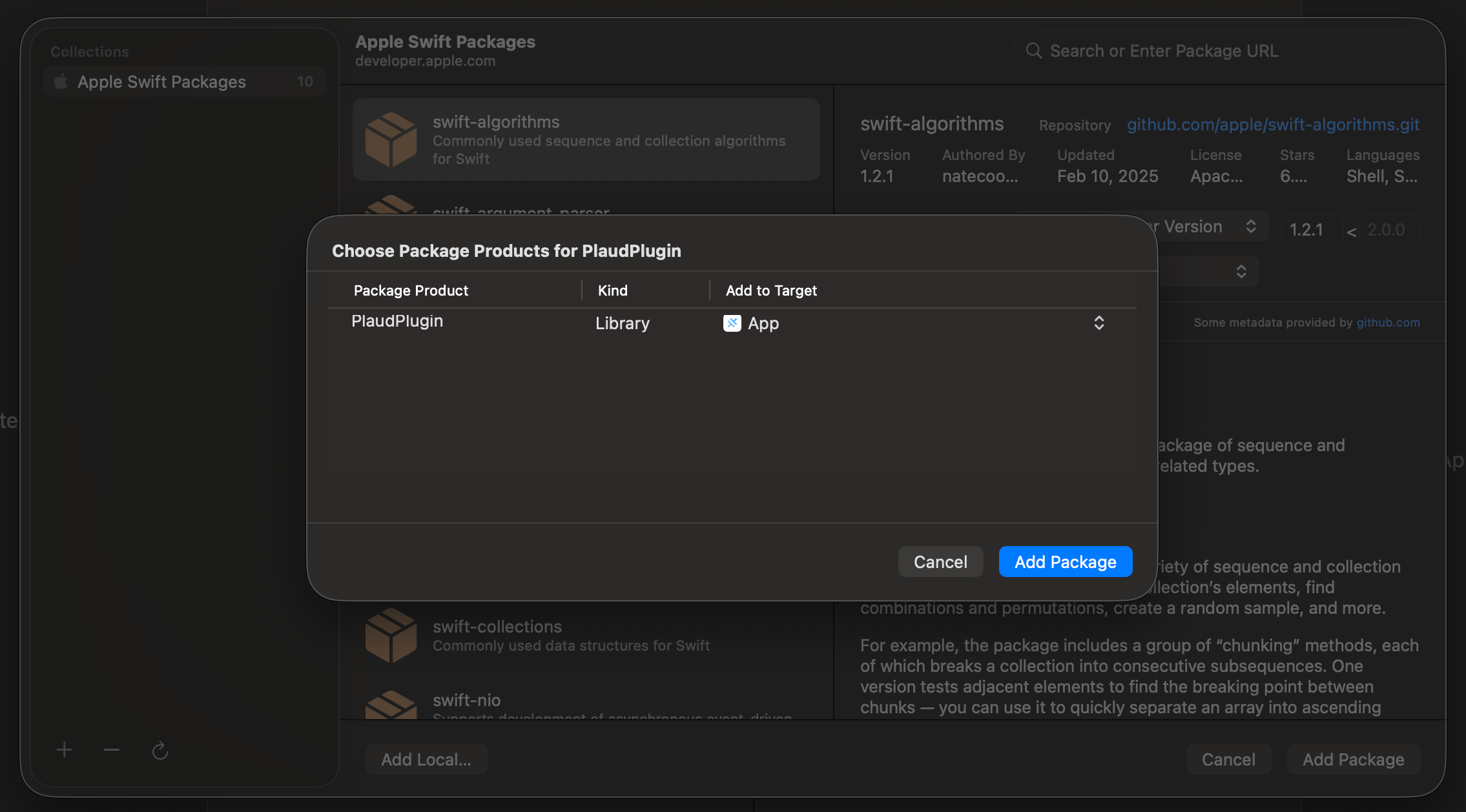
Link `PlaudPlugin` into the App target in Xcode.
Open the project (`npx cap open ios`), then **File -> Add Package Dependencies -> Add Local**,
Select `ios/PlaudPlugin`, and add the `PlaudPlugin` library product to the **App** target (the same way `CapApp-SPM` is already linked).
## How it works
[Capacitor](https://capacitorjs.com/) is a runtime to run web apps on native platforms. It works by wrapping your web app in a native shell, while Capacitor's bridge sends data from your web app to native features like iOS APIs and BLE.
```
┌──────────────────────────────────────────┐
│ Web App (JavaScript) │
│ PlaudSdk │
└──────────────────▲───────────────────────┘
│
Capacitor Bridge
(JavaScript ↔ IPC)
│
┌──────────────────▼───────────────────────┐
│ PlaudPlugin (Swift/Native) │
│ BLE, Files, iOS APIs, Events │
└──────────────────────────────────────────┘
```
Using the PlaudPlugin for Capacitor is actually using the [iOS SDK](/plaud-embedded/ios-sdk) behind the scenes.
For native iOS apps, use the [iOS SDK](/plaud-embedded/ios-sdk) directly.
## Setting Up Plaud Embedded's Capacitor Plugin
The Plaud Embedded Capacitor Skill has all of the context in these docs so your agent can immediately start wrapping your web app into a native iOS app with Plaud Embedded.
```bash theme={"system"}
npx skills add Plaud-AI/embedded-capacitor
```
### Step 1: Clone our Embedded Capacitor Repo
Clone the Plaud-AI/Embedded-Capacitor repo.
```bash theme={"system"}
git clone https://github.com/Plaud-AI/embedded-capacitor.git
```
This repo includes:
1. PlaudPlugin for Capacitor runtime
2. Typescript interfaces and utility functions for the PlaudPlugin
3. A sample app with a NextJS application using the Capacitor wrapper to work as a native iOS app
4. Plaud Capacitor Wrapper Skill for agents to implement the Plaud Plugin and the Capacitor runtime wrapper
### Step 2: Setup Capacitor
```bash theme={"system"}
npm i @capacitor/core @capacitor/ios @capacitor-community/bluetooth-le
npm i -D @capacitor/cli
```
Then initialize Capacitor to setup your Capacitor configs
```bash theme={"system"}
npx cap init
```
Lastly, add ios to your capacitor project and sync your web app
```bash theme={"system"}
npx cap add ios
npx cap sync ios
```
### Step 3: Setup the PlaudPlugin
Copy the `ios/PlaudPlugin/` framework and paste into the `ios/` directory.
Copy the `ios/App/App/MainViewController.swift` into your `ios/App/App` directory to register the PlaudPlugin.
Your `ios/` directory should look like this:
```
ios/
├── App/
│ ├── App/
│ │ └── MainViewController.swift
└── PlaudPlugin/
├── Package.swift
├── Frameworks/
│ ├── PlaudBleSDK.xcframework
│ ├── PlaudDeviceBasicSDK.xcframework
│ └── PlaudWiFiSDK.xcframework
└── Sources/
└── PlaudPlugin/
└── PlaudSdkPlugin.swift
```
Link `PlaudPlugin` into the App target in Xcode.
Open the project (`npx cap open ios`), then **File -> Add Package Dependencies -> Add Local**,
Select `ios/PlaudPlugin`, and add the `PlaudPlugin` library product to the **App** target (the same way `CapApp-SPM` is already linked).
 Add the Bluetooth entitlement in `ios/App/App/Info.plist`
```xml theme={"system"}
CFBundleDevelopmentRegion
en
...
NSBluetoothAlwaysUsageDescription
Uses Bluetooth to connect and interact with peripheral BLE devices.
UIBackgroundModes
bluetooth-central
```
Lastly, point the native shell at your web app's URL. Set this in the root
`capacitor.config.ts` — that's the source of truth.
```typescript theme={"system"}
import type { CapacitorConfig } from '@capacitor/cli';
const config: CapacitorConfig = {
appId: 'ai.plaud.capacitordemo',
appName: 'Plaud Capacitor Demo',
// Required by Capacitor even when loading a remote URL; its contents are
// ignored at runtime because `server.url` is set below.
webDir: 'public',
server: {
// The native shell loads your deployed site and Capacitor injects the
// native bridge, so the plugin can reach iOS CoreBluetooth.
url: 'https://plaud-capacitor-demo.vercel.app',
cleartext: false,
},
};
export default config;
```
## Start Using Plaud Embedded in Your "Web App"
With Capacitor, your web app can stay a web app **AND be a native iOS app!**
Add the Bluetooth entitlement in `ios/App/App/Info.plist`
```xml theme={"system"}
CFBundleDevelopmentRegion
en
...
NSBluetoothAlwaysUsageDescription
Uses Bluetooth to connect and interact with peripheral BLE devices.
UIBackgroundModes
bluetooth-central
```
Lastly, point the native shell at your web app's URL. Set this in the root
`capacitor.config.ts` — that's the source of truth.
```typescript theme={"system"}
import type { CapacitorConfig } from '@capacitor/cli';
const config: CapacitorConfig = {
appId: 'ai.plaud.capacitordemo',
appName: 'Plaud Capacitor Demo',
// Required by Capacitor even when loading a remote URL; its contents are
// ignored at runtime because `server.url` is set below.
webDir: 'public',
server: {
// The native shell loads your deployed site and Capacitor injects the
// native bridge, so the plugin can reach iOS CoreBluetooth.
url: 'https://plaud-capacitor-demo.vercel.app',
cleartext: false,
},
};
export default config;
```
## Start Using Plaud Embedded in Your "Web App"
With Capacitor, your web app can stay a web app **AND be a native iOS app!**
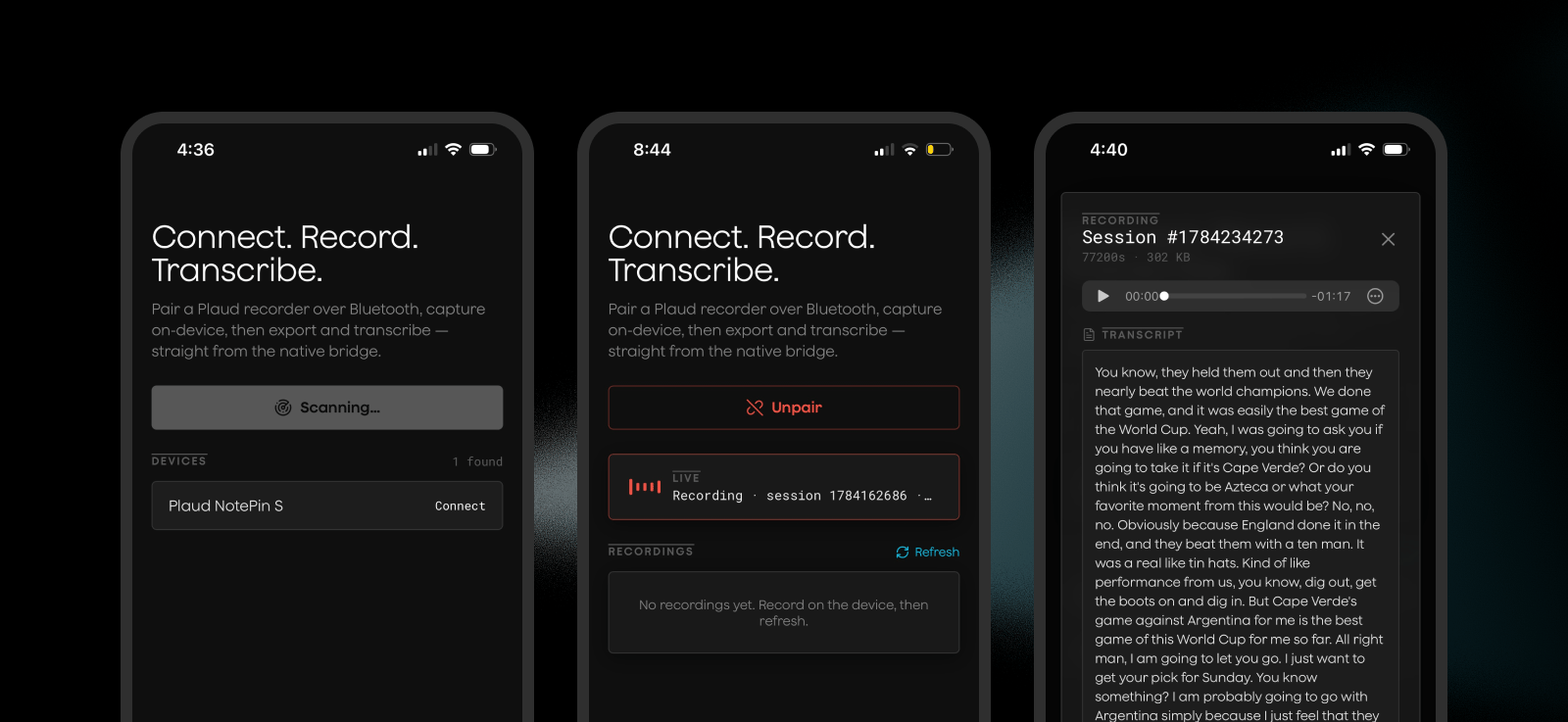 The key is to have mobile specific logic execute when your users are using a native mobile platform:
```typescript theme={"system"}
if (Capacitor.isNativePlatform()){
//Plaud SDK Logic
}
```
Use `plaud-sdk.ts` as a convenient typescript interface for interacting with the native iOS Plaud SDK, and write logic for connecting to devices, exporting audio, and triggering transcriptions directly from your web app.
```typescript theme={"system"}
import { Capacitor, type PluginListenerHandle } from "@capacitor/core";
import {
PlaudSdk,
readExportedFile,
type PlaudScanDevice,
type PlaudFile,
} from "@/lib/plaud-sdk";
const handleConnect = async (d: PlaudScanDevice) => {
setError(null);
if (!ensureNative()) return;
try {
setStatus(`connecting to ${d.name || d.serialNumber}…`);
await PlaudSdk.stopScan();
setScanning(false);
await PlaudSdk.connectBleDevice({ uuid: d.uuid, serialNumber: d.serialNumber });
} catch (err) {
setError(err instanceof Error ? err.message : String(err));
}
};
```
For the full list of relevant SDK methods for interacting with Plaud devices, see our [iOS SDK reference](/plaud-embedded/ios-sdk).
The key is to have mobile specific logic execute when your users are using a native mobile platform:
```typescript theme={"system"}
if (Capacitor.isNativePlatform()){
//Plaud SDK Logic
}
```
Use `plaud-sdk.ts` as a convenient typescript interface for interacting with the native iOS Plaud SDK, and write logic for connecting to devices, exporting audio, and triggering transcriptions directly from your web app.
```typescript theme={"system"}
import { Capacitor, type PluginListenerHandle } from "@capacitor/core";
import {
PlaudSdk,
readExportedFile,
type PlaudScanDevice,
type PlaudFile,
} from "@/lib/plaud-sdk";
const handleConnect = async (d: PlaudScanDevice) => {
setError(null);
if (!ensureNative()) return;
try {
setStatus(`connecting to ${d.name || d.serialNumber}…`);
await PlaudSdk.stopScan();
setScanning(false);
await PlaudSdk.connectBleDevice({ uuid: d.uuid, serialNumber: d.serialNumber });
} catch (err) {
setError(err instanceof Error ? err.message : String(err));
}
};
```
For the full list of relevant SDK methods for interacting with Plaud devices, see our [iOS SDK reference](/plaud-embedded/ios-sdk).