> ## Documentation Index
> Fetch the complete documentation index at: https://docs.plaud.ai/llms.txt
> Use this file to discover all available pages before exploring further.
# Transcription API
> Transcribe your user's conversation audio with Plaud's ASR and transcription models.
The Transcription API follows a polling model where you:
After using the [File Upload API](/plaud-embedded/file-api-overview) to generate a `file-download-url`,
you can submit the file to the Transcription API to kick off a transcription task.
Use the `GET /transcription` endpoint to poll the Transcription API for the task status.
On completion, the payload will include the transcribed data.
## Using the Transcription API
## Prerequisites
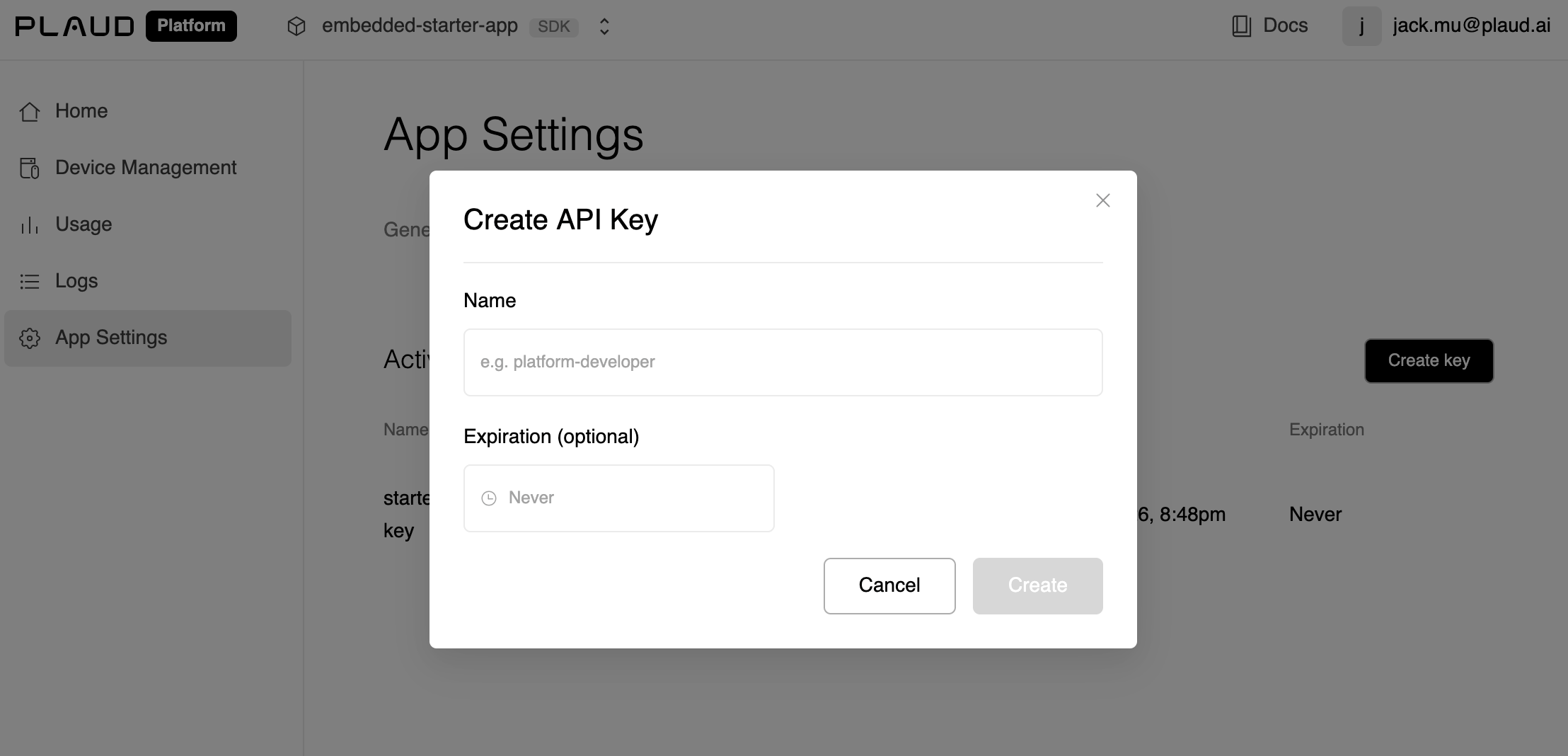
If you haven't done so, retrieve your `client_id` and `api_key` from the [developer portal](https://portal.plaud.ai).
The `api_key` is NOT your `client_secret`. Navigate to App Settings > API Keys.
 ## Find Your Region
The Transcription API is served with Plaud's **region-level** API services. There is no global host for these calls; pick the host of the region your client was provisioned in when using the Transcription API.
| Region | Public host | Status |
| --------- | ------------------------------------ | ----------- |
| US | `platform-us.plaud.ai/developer/api` | Available |
| Japan | `platform-jp.plaud.ai/developer/api` | Available |
| Europe | `platform-eu.plaud.ai/developer/api` | Coming soon |
| Singapore | `platform-sg.plaud.ai/developer/api` | Coming soon |
### Submit File for Transcription
Submit a transcription task for Plaud Embedded's transcription and ASR models to process.
```http theme={"system"}
POST [REGION_SPECIFIC_HOST]/open/partner/ai/transcriptions/
Content-Type: application/json
X-Client-Api-Key: [API_KEY]
X-Client-Id: [CLIENT_ID]
{
"file_url": "",
"params": {
"transcribe": { "language": "auto", "model": "plaud-fast-whisper" },
"vad": { "decode_silence": false },
"diarization": { "enabled": false, "return_embedding": false }
}
}
```
```json theme={"system"}
{
"transcription_id": "task_exec_xxx",
"status": "PENDING",
"data": {}
}
```
### Poll Transcription Task Until Completion
Check the status of your transcription task. On the `SUCCESS` status code, the transcript data will be included.
```http theme={"system"}
GET [REGION_SPECIFIC_HOST]/open/partner/ai/transcriptions/[TRANSCRIPTION_ID]
X-Client-Api-Key: [API_KEY]
X-Client-Id: [CLIENT_ID]
```
```json expandable theme={"system"}
{
"transcription_id": "task_exec_xxx",
"status": "SUCCESS",
"data": {
"text": "Meeting started at 10am...",
"language": "en",
"duration": 1843,
"segments": [
{
"start": 0,
"end": 4.2,
"text": "Meeting started at 10am.",
"speaker": "Speaker 1"
}
]
}
}
```
**Try the Plaud Embedded Skill** to have your coding agent help you with your API implementation.
```bash theme={"system"}
npx skills add Plaud-AI/plaud-embedded-skills
```
Visit our [GitHub repo](https://github.com/Plaud-AI/plaud-embedded-skills.git) for more details on the skill.
## Find Your Region
The Transcription API is served with Plaud's **region-level** API services. There is no global host for these calls; pick the host of the region your client was provisioned in when using the Transcription API.
| Region | Public host | Status |
| --------- | ------------------------------------ | ----------- |
| US | `platform-us.plaud.ai/developer/api` | Available |
| Japan | `platform-jp.plaud.ai/developer/api` | Available |
| Europe | `platform-eu.plaud.ai/developer/api` | Coming soon |
| Singapore | `platform-sg.plaud.ai/developer/api` | Coming soon |
### Submit File for Transcription
Submit a transcription task for Plaud Embedded's transcription and ASR models to process.
```http theme={"system"}
POST [REGION_SPECIFIC_HOST]/open/partner/ai/transcriptions/
Content-Type: application/json
X-Client-Api-Key: [API_KEY]
X-Client-Id: [CLIENT_ID]
{
"file_url": "",
"params": {
"transcribe": { "language": "auto", "model": "plaud-fast-whisper" },
"vad": { "decode_silence": false },
"diarization": { "enabled": false, "return_embedding": false }
}
}
```
```json theme={"system"}
{
"transcription_id": "task_exec_xxx",
"status": "PENDING",
"data": {}
}
```
### Poll Transcription Task Until Completion
Check the status of your transcription task. On the `SUCCESS` status code, the transcript data will be included.
```http theme={"system"}
GET [REGION_SPECIFIC_HOST]/open/partner/ai/transcriptions/[TRANSCRIPTION_ID]
X-Client-Api-Key: [API_KEY]
X-Client-Id: [CLIENT_ID]
```
```json expandable theme={"system"}
{
"transcription_id": "task_exec_xxx",
"status": "SUCCESS",
"data": {
"text": "Meeting started at 10am...",
"language": "en",
"duration": 1843,
"segments": [
{
"start": 0,
"end": 4.2,
"text": "Meeting started at 10am.",
"speaker": "Speaker 1"
}
]
}
}
```
**Try the Plaud Embedded Skill** to have your coding agent help you with your API implementation.
```bash theme={"system"}
npx skills add Plaud-AI/plaud-embedded-skills
```
Visit our [GitHub repo](https://github.com/Plaud-AI/plaud-embedded-skills.git) for more details on the skill.