> ## Documentation Index
> Fetch the complete documentation index at: https://docs.plaud.ai/llms.txt
> Use this file to discover all available pages before exploring further.
# Plaud Embedded Overview
Plaud Embedded is part of Plaud's developer platform **for builders who want to integrate their user-facing products with Plaud's first-class recording devices and text-to-speech models**.
Examples of use cases for Plaud Embedded include:
1. A healthtech platform that automates documentation from physician-patient conversations captured with Plaud devices
2. An AI coaching product that uses Plaud devices to capture conversations for agents to use as context
3. A sales platform that captures offline sales meetings with Plaud devices
 ***
## Why Plaud Embedded?
### 1. Purpose-built Devices for Capturing Audio
Plaud devices were built to capture conversation-based work. Rather than forcing users to record conversation using your phone directly, Plaud devices have:
* **Long-lasting batteries** so your users don't need to drain their phones
* **Higher-quality microphones** that can pick up on conversations feets away
* **64 GB storage with encryption** so audio data can be held locally and shared only when users want
* Light and convenient designs that **don't take away from your users' in-person experiences**
Designed for phone calls and conversation-heavy workflows.
Designed for hands-free, on-the-go use in field work, healthcare, and retail.
Read more about [Plaud devices](/plaud-embedded/devices).
### 2. State-of-the-art Text-to-speech Models
Plaud's Automatic Speech Recognition (ASR) models were trained to be able to accurately attribute speakers and transcribe audio even with background noises, overlapping speakers, different languages (100+), and distance from mics.
***
## Why Plaud Embedded?
### 1. Purpose-built Devices for Capturing Audio
Plaud devices were built to capture conversation-based work. Rather than forcing users to record conversation using your phone directly, Plaud devices have:
* **Long-lasting batteries** so your users don't need to drain their phones
* **Higher-quality microphones** that can pick up on conversations feets away
* **64 GB storage with encryption** so audio data can be held locally and shared only when users want
* Light and convenient designs that **don't take away from your users' in-person experiences**
Designed for phone calls and conversation-heavy workflows.
Designed for hands-free, on-the-go use in field work, healthcare, and retail.
Read more about [Plaud devices](/plaud-embedded/devices).
### 2. State-of-the-art Text-to-speech Models
Plaud's Automatic Speech Recognition (ASR) models were trained to be able to accurately attribute speakers and transcribe audio even with background noises, overlapping speakers, different languages (100+), and distance from mics.
 Your app can leverage our ASR models via the [Transcription API](/plaud-embedded/transcription-api-overview)
***
## How it Works
Plaud Embedded's architecture has 4 main components:
1. **Your backend services**
2. **Your mobile app**
3. **Plaud devices**
4. **Plaud's cloud services**
Your app can leverage our ASR models via the [Transcription API](/plaud-embedded/transcription-api-overview)
***
## How it Works
Plaud Embedded's architecture has 4 main components:
1. **Your backend services**
2. **Your mobile app**
3. **Plaud devices**
4. **Plaud's cloud services**
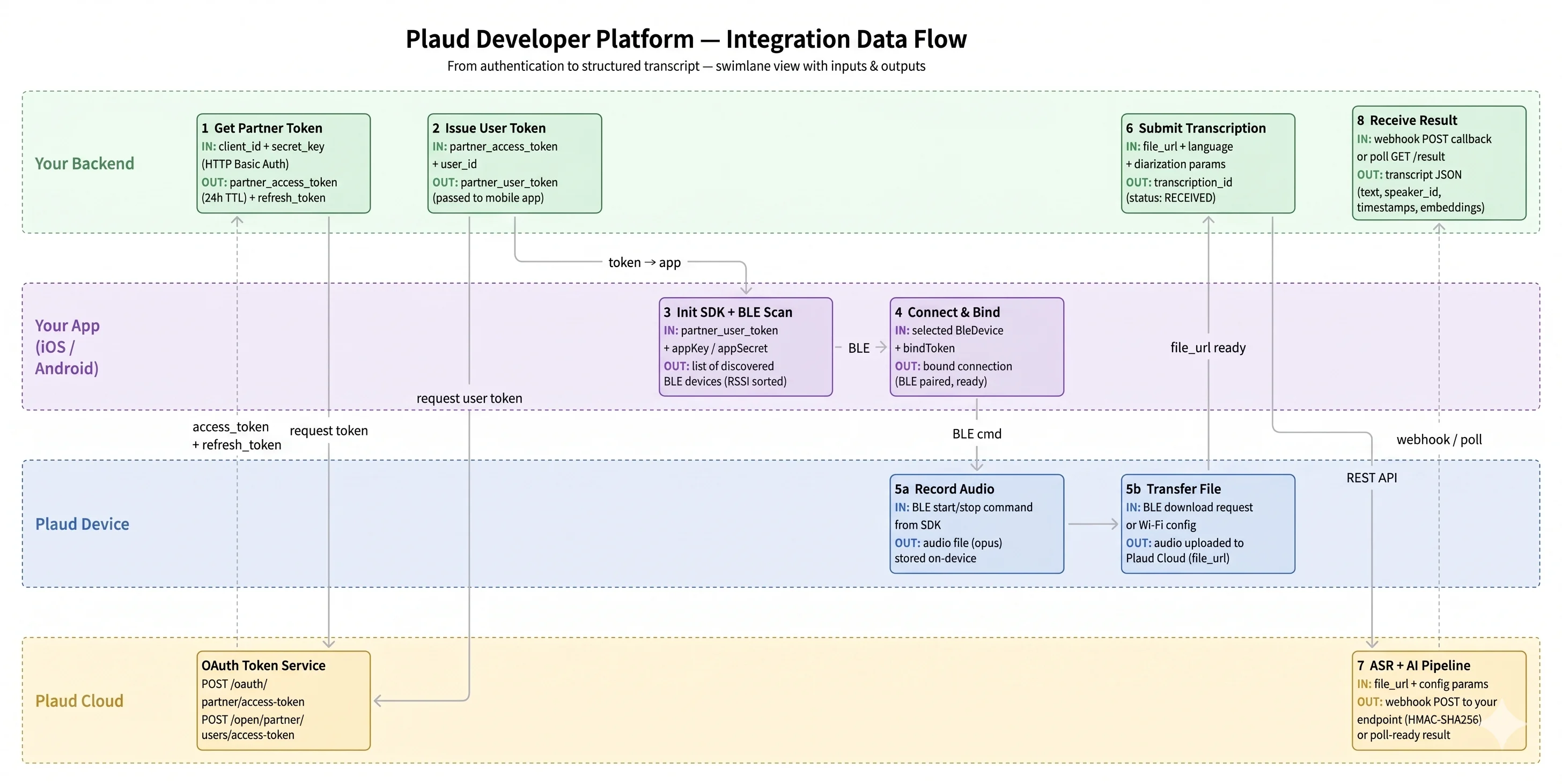 At a high level, the system interactions goes:
**Your backend services** exchanges `client_id` and `client_secret` for a valid user token from **Plaud's cloud services**.
Pass the **user token** to **your mobile app** to connect and bind your users' **Plaud device**
**Each of your users' unique Plaud devices can only be bound to one app**. This is necessary for offline encryption so even if a device is stolen, the data remains inaccessible.
Sync audio files from **Plaud devices** to **your backend** either through BLE (Bluetooth Low Energy) or Wifi connection. Pass the `file_url` to **Plaud's cloud services** to receive the full transcription via Plaud's Transcription API.
If you want a walkthrough of how the SDKs and APIs fit together, read the [How Plaud Embedded Works Guide](/plaud-embedded/how-plaud-embedded-works).
If you're ready to get started, go to the [Plaud Embedded Quickstart](/plaud-embedded/quickstart)!
## Key Definitions
| Term | Definition | More Information |
| :---------------------- | :------------------------------------------------------------------------------------------------------------------------------------------------------------------------------------------------------------------------------------------------------ | :-------------------------------------------------------------------------------------------------------- |
| **Binding a device** | **Linking your users' Plaud device** with your mobile application to enable encryption, decryption, and syncing | [Binding with the SDK](/plaud-embedded/how-plaud-embedded-works#binding-plaud-devices-to-your-mobile-app) |
| **Partner Application** | **That's your application!** We think of Plaud Embedded users as our partners as this platform would be nowhere without you. Your application can bind to your users' Plaud devices and use our transcription models to power your product's use cases. | [Talk to sales for custom plans and support](https://dev.plaud.ai/contact/) |
| **Partner Token** | An **application-level** token used to mint user-specific User Tokens. | [Authentication API](/plaud-embedded/auth-api-overview) |
| **User Token** | A **user-specific** token used to bind your users' Plaud devices to your mobile app | [Authentication API](/plaud-embedded/auth-api-overview) |
| **BLE Connection** | Plaud devices pair to your mobile app via Bluetooth Low Energy (BLE). **BLE is also the default way audio files are synced** from your users' Plaud device to your mobile app. | [Connecting to a Plaud device](/plaud-embedded/ios-sdk#connecting-binding-to-a-plaud-device) |
| **WiFi Fast Transfer** | Although BLE is Plaud devices' default way of syncing files from device to your mobile app, WiFi Fast Transfer is an alternative way of syncing files that's **\~10x faster**. | [Embedded SDK method](/plaud-embedded/ios-sdk#wifi-fast-transfer) |
## Frequently asked questions
No. With the SDK, Plaud acts as infrastructure for your product — you pay for transcription usage and the number of connected devices, and you own the product experience and pricing for your app.
Phones are not designed for capturing in-person conversations, nor can they capture phone calls without significant effort. They also drain the phone battery, create an awkward end-user experience, and lack built-in state-of-the-art transcription. Plaud devices and the SDK address all of this.
Yes. The Plaud Embedded SDK integrates directly into your iOS or Android application. Your app handles device pairing, recording controls, and user experience — Plaud provides the SDK, transcription API, and a starter app to build from.
112 languages, with published accuracy benchmarks by language, scenario, and environment.
Free tier accounts have starter limits on **monthly transcription minutes** and **connected devices per client**. These are intended for prototyping and evaluation. Contact us through the developer console to upgrade to a production tier with raised or unmetered limits.
At a high level, the system interactions goes:
**Your backend services** exchanges `client_id` and `client_secret` for a valid user token from **Plaud's cloud services**.
Pass the **user token** to **your mobile app** to connect and bind your users' **Plaud device**
**Each of your users' unique Plaud devices can only be bound to one app**. This is necessary for offline encryption so even if a device is stolen, the data remains inaccessible.
Sync audio files from **Plaud devices** to **your backend** either through BLE (Bluetooth Low Energy) or Wifi connection. Pass the `file_url` to **Plaud's cloud services** to receive the full transcription via Plaud's Transcription API.
If you want a walkthrough of how the SDKs and APIs fit together, read the [How Plaud Embedded Works Guide](/plaud-embedded/how-plaud-embedded-works).
If you're ready to get started, go to the [Plaud Embedded Quickstart](/plaud-embedded/quickstart)!
## Key Definitions
| Term | Definition | More Information |
| :---------------------- | :------------------------------------------------------------------------------------------------------------------------------------------------------------------------------------------------------------------------------------------------------ | :-------------------------------------------------------------------------------------------------------- |
| **Binding a device** | **Linking your users' Plaud device** with your mobile application to enable encryption, decryption, and syncing | [Binding with the SDK](/plaud-embedded/how-plaud-embedded-works#binding-plaud-devices-to-your-mobile-app) |
| **Partner Application** | **That's your application!** We think of Plaud Embedded users as our partners as this platform would be nowhere without you. Your application can bind to your users' Plaud devices and use our transcription models to power your product's use cases. | [Talk to sales for custom plans and support](https://dev.plaud.ai/contact/) |
| **Partner Token** | An **application-level** token used to mint user-specific User Tokens. | [Authentication API](/plaud-embedded/auth-api-overview) |
| **User Token** | A **user-specific** token used to bind your users' Plaud devices to your mobile app | [Authentication API](/plaud-embedded/auth-api-overview) |
| **BLE Connection** | Plaud devices pair to your mobile app via Bluetooth Low Energy (BLE). **BLE is also the default way audio files are synced** from your users' Plaud device to your mobile app. | [Connecting to a Plaud device](/plaud-embedded/ios-sdk#connecting-binding-to-a-plaud-device) |
| **WiFi Fast Transfer** | Although BLE is Plaud devices' default way of syncing files from device to your mobile app, WiFi Fast Transfer is an alternative way of syncing files that's **\~10x faster**. | [Embedded SDK method](/plaud-embedded/ios-sdk#wifi-fast-transfer) |
## Frequently asked questions
No. With the SDK, Plaud acts as infrastructure for your product — you pay for transcription usage and the number of connected devices, and you own the product experience and pricing for your app.
Phones are not designed for capturing in-person conversations, nor can they capture phone calls without significant effort. They also drain the phone battery, create an awkward end-user experience, and lack built-in state-of-the-art transcription. Plaud devices and the SDK address all of this.
Yes. The Plaud Embedded SDK integrates directly into your iOS or Android application. Your app handles device pairing, recording controls, and user experience — Plaud provides the SDK, transcription API, and a starter app to build from.
112 languages, with published accuracy benchmarks by language, scenario, and environment.
Free tier accounts have starter limits on **monthly transcription minutes** and **connected devices per client**. These are intended for prototyping and evaluation. Contact us through the developer console to upgrade to a production tier with raised or unmetered limits.