> ## Documentation Index
> Fetch the complete documentation index at: https://docs.plaud.ai/llms.txt
> Use this file to discover all available pages before exploring further.
# Using Flutter
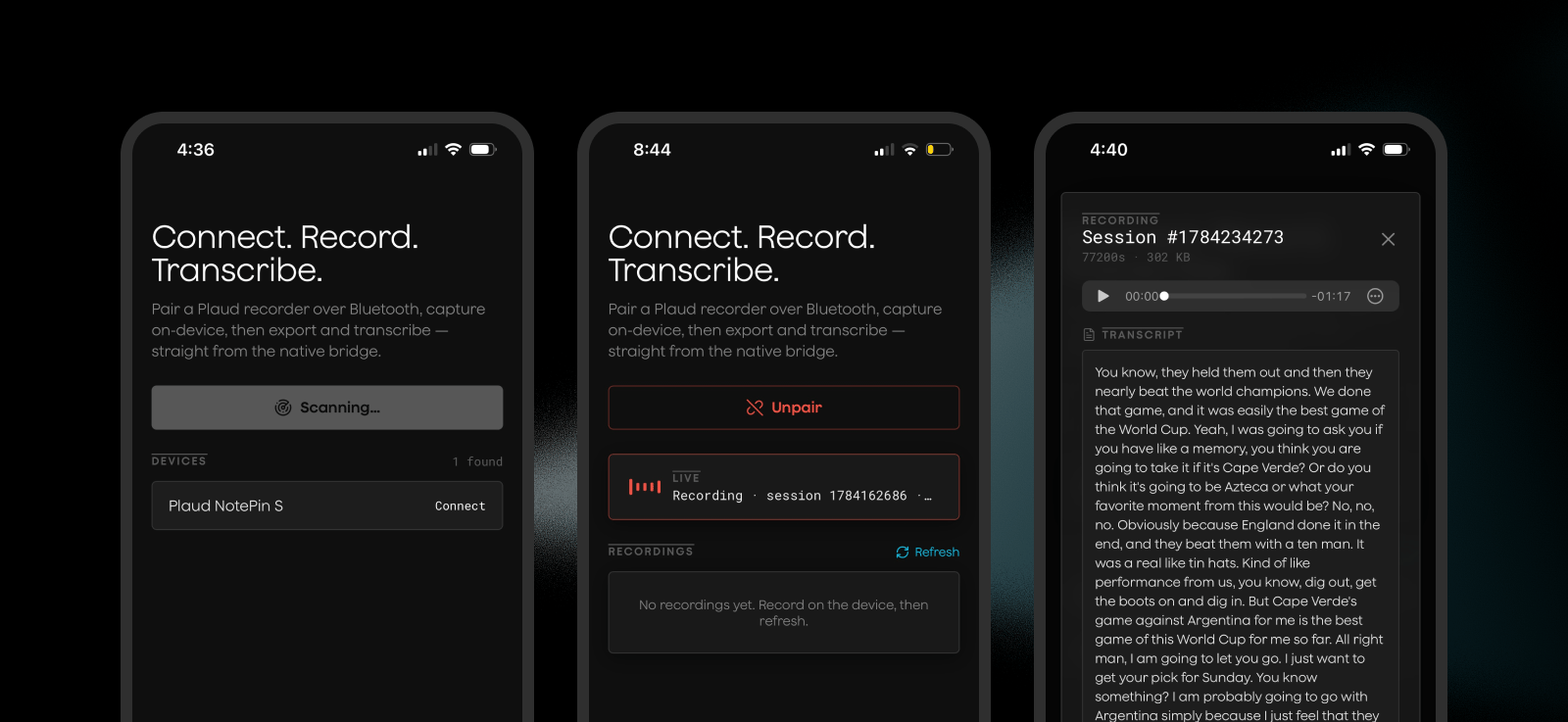
You can use Plaud's iOS SDK in Flutter through a [Flutter plugin](https://docs.flutter.dev/packages-and-plugins/developing-packages#plugin). Use our `plaud_sdk` plugin as a starter template for:
1. Connecting to Plaud Devices
2. Syncing audio files
3. Transcription
 For advanced usage of the Embedded SDK methods for use cases like WiFi fast transfers, we recommend adding more methods to this plugin or using the native [Embedded iOS SDK](/plaud-embedded/ios-sdk) directly
## How it works
Flutter uses [platform channels](https://docs.flutter.dev/platform-integration/platform-channels) to let your Flutter app call native platform code. A [plugin](https://docs.flutter.dev/packages-and-plugins/developing-packages#plugin) packages that native code so it can be dropped into any Flutter app.
Plaud Embedded's plugin can be added as a path dependency, imported as a typed Dart library, and ran as native code via the [Embedded iOS SDK](/plaud-embedded/ios-sdk).
```
your Flutter code
│ import 'package:plaud_sdk/plaud_sdk.dart'
▼
┌─────────────────────────────┐
│ Dart layer (lib/*.dart) │ static PlaudSdk API, fully typed,
│ │ guard with isPlaudSdkAvailable off-iOS
└─────────────────────────────┘
│ MethodChannel (calls) / EventChannel (typed streams)
┌─────────────────────────────┐
│ Plaud native SDK │ three precompiled .xcframeworks
│ (ios/Frameworks/*) │ BLE / Device / WiFi
└─────────────────────────────┘
```
Plaud's Flutter plugin uses a `MethodChannel` for method calls and an `EventChannel` for event listening, passing data between the Dart layer and the native SDK.
## Running the Demo App
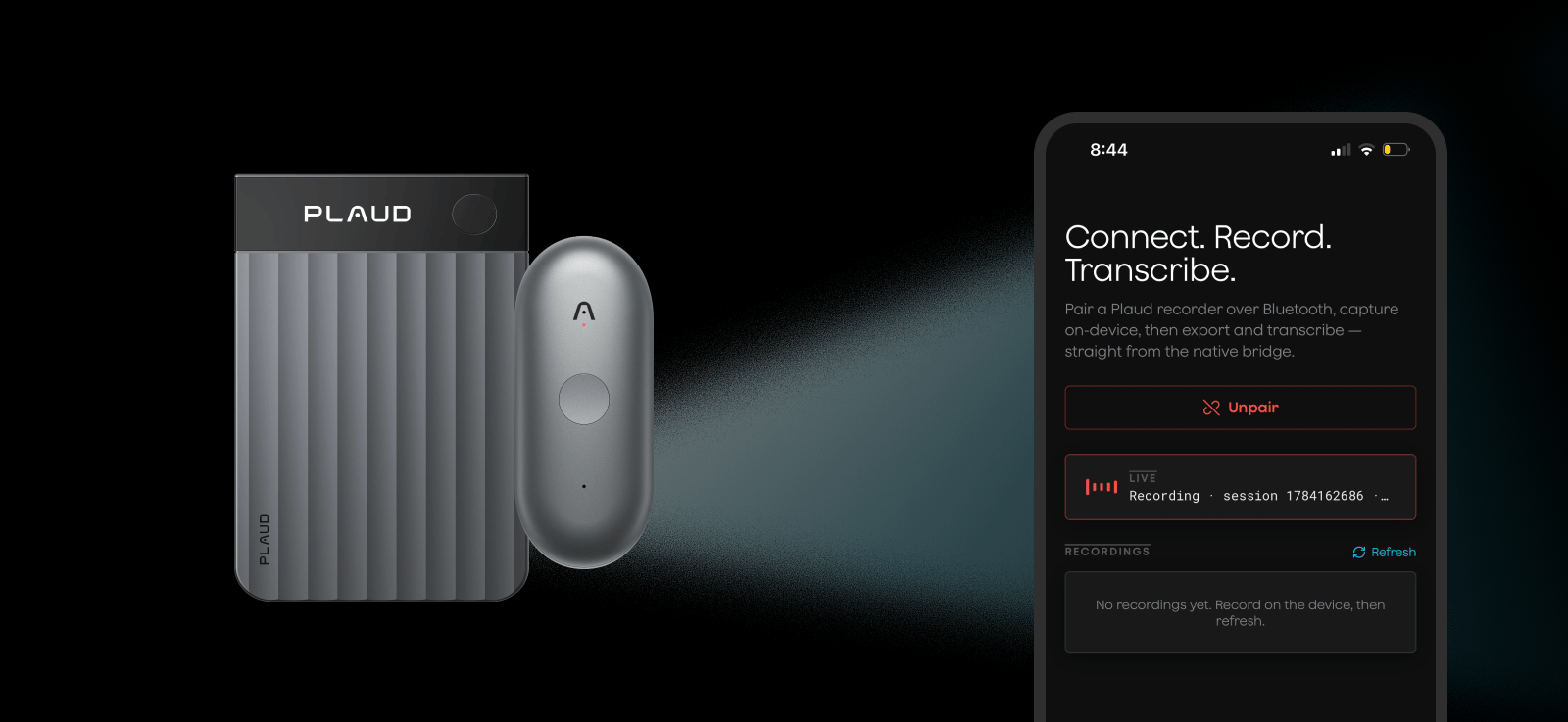
The demo app is included in the Plaud Embedded Flutter repo as reference for implementing the plugin in your own app and seeing how it works.
```bash theme={"system"}
git clone https://github.com/Plaud-AI/embedded-flutter.git
```
```bash theme={"system"}
cd embedded-flutter
flutter pub get
cp .env.example .env
```
You can retrieve your environment credentials from the [developer portal](https://portal.plaud.ai) and generate a token from our [API playground](https://plaud-embedded-playground.vercel.app)
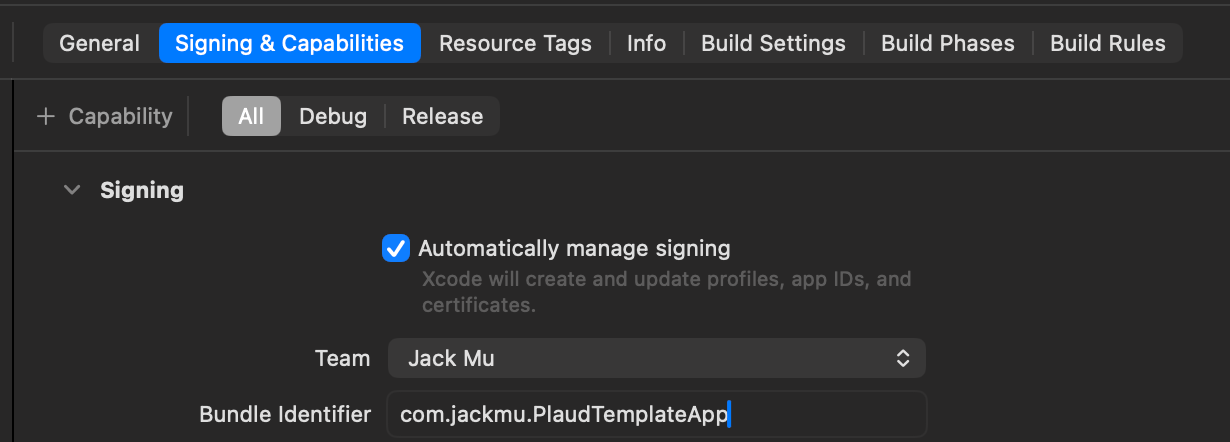
Open `ios/Runner.xcworkspace` once to set your Apple developer team (Runner → Signing & Capabilities).
For advanced usage of the Embedded SDK methods for use cases like WiFi fast transfers, we recommend adding more methods to this plugin or using the native [Embedded iOS SDK](/plaud-embedded/ios-sdk) directly
## How it works
Flutter uses [platform channels](https://docs.flutter.dev/platform-integration/platform-channels) to let your Flutter app call native platform code. A [plugin](https://docs.flutter.dev/packages-and-plugins/developing-packages#plugin) packages that native code so it can be dropped into any Flutter app.
Plaud Embedded's plugin can be added as a path dependency, imported as a typed Dart library, and ran as native code via the [Embedded iOS SDK](/plaud-embedded/ios-sdk).
```
your Flutter code
│ import 'package:plaud_sdk/plaud_sdk.dart'
▼
┌─────────────────────────────┐
│ Dart layer (lib/*.dart) │ static PlaudSdk API, fully typed,
│ │ guard with isPlaudSdkAvailable off-iOS
└─────────────────────────────┘
│ MethodChannel (calls) / EventChannel (typed streams)
┌─────────────────────────────┐
│ Plaud native SDK │ three precompiled .xcframeworks
│ (ios/Frameworks/*) │ BLE / Device / WiFi
└─────────────────────────────┘
```
Plaud's Flutter plugin uses a `MethodChannel` for method calls and an `EventChannel` for event listening, passing data between the Dart layer and the native SDK.
## Running the Demo App
The demo app is included in the Plaud Embedded Flutter repo as reference for implementing the plugin in your own app and seeing how it works.
```bash theme={"system"}
git clone https://github.com/Plaud-AI/embedded-flutter.git
```
```bash theme={"system"}
cd embedded-flutter
flutter pub get
cp .env.example .env
```
You can retrieve your environment credentials from the [developer portal](https://portal.plaud.ai) and generate a token from our [API playground](https://plaud-embedded-playground.vercel.app)
Open `ios/Runner.xcworkspace` once to set your Apple developer team (Runner → Signing & Capabilities).
 Then **run on a physical device** to test out the demo app with your Plaud devices. Credentials are compile-time defines, so `--dart-define-from-file=.env` is required on every run.
```bash theme={"system"}
flutter run --dart-define-from-file=.env
```
Then **run on a physical device** to test out the demo app with your Plaud devices. Credentials are compile-time defines, so `--dart-define-from-file=.env` is required on every run.
```bash theme={"system"}
flutter run --dart-define-from-file=.env
```
 ## How to Integrate with your Flutter App
Try the Embedded Flutter Skill to upload this doc and the codebase context for your agent.
```bash theme={"system"}
npx skills add Plaud-AI/embedded_flutter
```
### Prerequisites
| Tool | Notes |
| --------------------- | ------------------------------------------ |
| Flutter | Dart SDK 3.12+ |
| Xcode | 15.x+, with a physical iPhone + Apple ID |
| CocoaPods | `brew install cocoapods` |
| iOS deployment target | **14.0** (the Plaud frameworks require it) |
### Step 1: Clone the Plaud Embedded Flutter Repo
```bash theme={"system"}
git clone https://github.com/Plaud-AI/embedded-flutter.git
```
This repo includes:
1. Flutter plugin (`plugins/plaud_sdk`) for the Plaud iOS SDK for basic functionality
2. Example Flutter app
3. Skill for implementing the Plaud Embedded plugin within projects
### Step 2: Copy the Plaud Embedded Plugin into your App
At the root of your Flutter project, copy `plugins/plaud_sdk` into your project's `plugins` directory.
```bash theme={"system"}
cp -R plugins/plaud_sdk your-app/plugins/plaud_sdk
```
Then depend on the plugin via a path reference in your `pubspec.yaml`:
```yaml pubspec.yaml theme={"system"}
dependencies:
plaud_sdk:
path: plugins/plaud_sdk
```
```bash theme={"system"}
flutter pub get
```
Flutter's plugin autolinking handles importing the plaud\_sdk plugin; no extra configuration is needed.
### Step 3: Configure iOS
Set the deployment target to **15.1** in `ios/Podfile` (`platform :ios, '15.1'`) and the Runner Xcode target — the Plaud frameworks require it, don't go lower.
Then add BLE permissions to `ios/Runner/Info.plist` for the Plaud SDK to leverage iOS's native bluetooth functionality (without the first key, the app hard-crashes the moment it touches Bluetooth).
```xml Info.plist theme={"system"}
NSBluetoothAlwaysUsageDescription
Plaud uses Bluetooth to connect to your recorder and sync recordings.
UIBackgroundModes
bluetooth-central
```
### Step 4: Use the Plaud SDK from Flutter
You can now import the `plaud_sdk` library and use the [Embedded iOS SDK](/plaud-embedded/ios-sdk) straight from your Flutter project in Dart. Guard every call with `isPlaudSdkAvailable`, init once, subscribe to the streams, then drive it — and cancel your subscriptions in `dispose()`.
```dart theme={"system"}
import 'package:plaud_sdk/plaud_sdk.dart';
if (!isPlaudSdkAvailable) { /* off-device: show a "device required" state */ }
await PlaudSdk.initSDK(
userAccessToken: token, // per-user Bearer JWT
customDomain: 'platform-us.plaud.ai', // domain only, no https://
userId: 'your-app-user-id', // default connect deviceToken
);
final subs = [
PlaudSdk.onScanResult.listen((devices) {/* show devices */}),
PlaudSdk.onConnectState.listen((s) {
if (s.connected) PlaudSdk.getFileList(); // load recordings on connect
}),
PlaudSdk.onFileList.listen((files) {/* show recordings */}),
PlaudSdk.onExportProgress.listen((p) {/* p.progress (0–100), p.message */}),
];
await PlaudSdk.startScan();
await PlaudSdk.connectBleDevice(uuid: device.uuid); // from an onScanResult device
final export = await PlaudSdk.exportAudio(
sessionId: file.sessionId,
format: PlaudAudioFormat.mp3,
);
// export.outputPath → the decoded mp3 under Documents/PlaudExports
for (final s in subs) { s.cancel(); }
```
### Step 5: Run Your App
```bash theme={"system"}
flutter pub get
flutter run --dart-define-from-file=.env # physical iPhone required
```
For the full list of relevant SDK methods for interacting with Plaud devices, see our [iOS SDK reference](/plaud-embedded/ios-sdk).
## How to Integrate with your Flutter App
Try the Embedded Flutter Skill to upload this doc and the codebase context for your agent.
```bash theme={"system"}
npx skills add Plaud-AI/embedded_flutter
```
### Prerequisites
| Tool | Notes |
| --------------------- | ------------------------------------------ |
| Flutter | Dart SDK 3.12+ |
| Xcode | 15.x+, with a physical iPhone + Apple ID |
| CocoaPods | `brew install cocoapods` |
| iOS deployment target | **14.0** (the Plaud frameworks require it) |
### Step 1: Clone the Plaud Embedded Flutter Repo
```bash theme={"system"}
git clone https://github.com/Plaud-AI/embedded-flutter.git
```
This repo includes:
1. Flutter plugin (`plugins/plaud_sdk`) for the Plaud iOS SDK for basic functionality
2. Example Flutter app
3. Skill for implementing the Plaud Embedded plugin within projects
### Step 2: Copy the Plaud Embedded Plugin into your App
At the root of your Flutter project, copy `plugins/plaud_sdk` into your project's `plugins` directory.
```bash theme={"system"}
cp -R plugins/plaud_sdk your-app/plugins/plaud_sdk
```
Then depend on the plugin via a path reference in your `pubspec.yaml`:
```yaml pubspec.yaml theme={"system"}
dependencies:
plaud_sdk:
path: plugins/plaud_sdk
```
```bash theme={"system"}
flutter pub get
```
Flutter's plugin autolinking handles importing the plaud\_sdk plugin; no extra configuration is needed.
### Step 3: Configure iOS
Set the deployment target to **15.1** in `ios/Podfile` (`platform :ios, '15.1'`) and the Runner Xcode target — the Plaud frameworks require it, don't go lower.
Then add BLE permissions to `ios/Runner/Info.plist` for the Plaud SDK to leverage iOS's native bluetooth functionality (without the first key, the app hard-crashes the moment it touches Bluetooth).
```xml Info.plist theme={"system"}
NSBluetoothAlwaysUsageDescription
Plaud uses Bluetooth to connect to your recorder and sync recordings.
UIBackgroundModes
bluetooth-central
```
### Step 4: Use the Plaud SDK from Flutter
You can now import the `plaud_sdk` library and use the [Embedded iOS SDK](/plaud-embedded/ios-sdk) straight from your Flutter project in Dart. Guard every call with `isPlaudSdkAvailable`, init once, subscribe to the streams, then drive it — and cancel your subscriptions in `dispose()`.
```dart theme={"system"}
import 'package:plaud_sdk/plaud_sdk.dart';
if (!isPlaudSdkAvailable) { /* off-device: show a "device required" state */ }
await PlaudSdk.initSDK(
userAccessToken: token, // per-user Bearer JWT
customDomain: 'platform-us.plaud.ai', // domain only, no https://
userId: 'your-app-user-id', // default connect deviceToken
);
final subs = [
PlaudSdk.onScanResult.listen((devices) {/* show devices */}),
PlaudSdk.onConnectState.listen((s) {
if (s.connected) PlaudSdk.getFileList(); // load recordings on connect
}),
PlaudSdk.onFileList.listen((files) {/* show recordings */}),
PlaudSdk.onExportProgress.listen((p) {/* p.progress (0–100), p.message */}),
];
await PlaudSdk.startScan();
await PlaudSdk.connectBleDevice(uuid: device.uuid); // from an onScanResult device
final export = await PlaudSdk.exportAudio(
sessionId: file.sessionId,
format: PlaudAudioFormat.mp3,
);
// export.outputPath → the decoded mp3 under Documents/PlaudExports
for (final s in subs) { s.cancel(); }
```
### Step 5: Run Your App
```bash theme={"system"}
flutter pub get
flutter run --dart-define-from-file=.env # physical iPhone required
```
For the full list of relevant SDK methods for interacting with Plaud devices, see our [iOS SDK reference](/plaud-embedded/ios-sdk).